

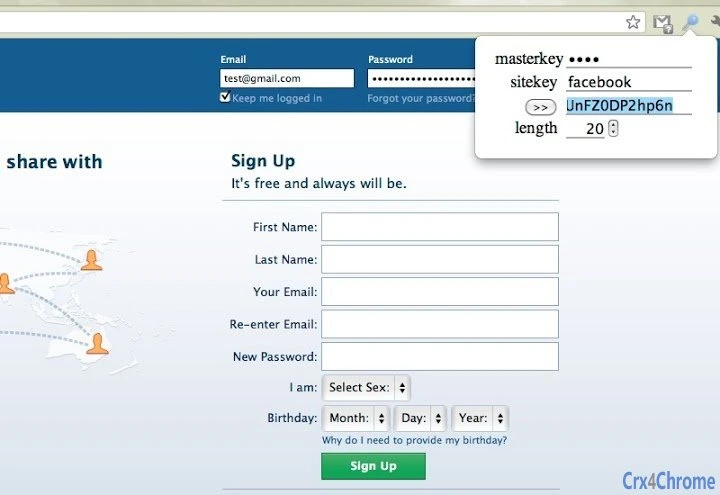
Description
123 Password: Secure, Auto-Fill Passwords Without Storage
Overview
The 123 Password browser extension is designed to generate unique, strong passwords for every website you visit, eliminating the need to remember multiple credentials. By combining a user-defined master key with a site-specific key derived from the URL, it ensures that each password is distinct and cryptographically secure. This approach addresses common security risks associated with password reuse and weak credentials, making it ideal for individuals seeking enhanced online privacy without relying on cloud-based storage.
Target users include privacy-conscious consumers, frequent internet users, and professionals managing multiple online accounts. The extension operates entirely within the browser, with no data stored on external servers, which enhances protection against data breaches and hardware theft. Real-world usage scenarios include securing banking, email, social media, and e-commerce accounts with unique, unpredictable passwords that are automatically filled upon login.
While the developer’s background is not publicly detailed, the extension’s design reflects a focus on cryptographic integrity and user autonomy. It supports major operating systems, including Windows, Mac, and Linux, ensuring broad accessibility. The developer did not provide additional system requirements or performance benchmarks.
Key Features & Capabilities
- Master Key + Site Key Generation: Creates unique passwords using a user-defined master key and a site-specific key extracted from the URL, ensuring no two passwords are alike.
- Automatic Password Filling: Detects login fields in real time and auto-fills credentials without requiring copy-paste, streamlining the login process.
- Customizable Password Length: Allows users to adjust the length of generated passwords, with the extension remembering individual site preferences.
- Entropy-Based Master Key Warning: Alerts users if their master key has insufficient entropy (less than 40-bit), helping prevent weak password creation.
- Local-Only Operation: All password generation occurs locally; no data is stored, transmitted, or saved on any server, ensuring maximum privacy.
- Algorithm Security: Uses HMAC with MD5 to derive passwords, making it computationally infeasible to reverse-engineer other passwords even if one is exposed.
These features enable secure, efficient access to online accounts. For example, a user logging into Gmail, Amazon, and a banking portal receives three distinct 20-character passwords, each generated from the same master key but different site keys. The extension remembers length preferences per site, reducing the need for repeated configuration.
User Interface, Workflow & Performance
The user interface is minimal and integrated directly into the browser’s extension menu. It provides a clean, straightforward layout with fields for the master key, site key, and generated password. Users can adjust the password length and trigger generation with a single click or through auto-fill.
Navigating the extension is intuitive, with the auto-fill feature prioritizing the currently focused input field. This behavior improves workflow efficiency, especially during multi-account logins. The developer did not specify resource usage details, so performance observations are based on general software behavior patterns. However, the small file size (1.5 MB) suggests lightweight operation, and the absence of cloud syncing implies minimal background activity.
Stability appears to be well-maintained, as evidenced by the consistent update history and bug fixes in version 1.7, including resolution of auto-fill failures and input field synchronization issues. No reports of crashes or memory leaks were noted in the provided changelog.
Compatibility & System Requirements
123 Password is compatible with Windows, Mac, and Linux operating systems, ensuring broad accessibility across desktop environments. It functions as a browser extension, meaning it requires a compatible web browser to operate, though the specific browser support was not detailed in the provided information.
The installation size is 1.5 MB, which is compact and suitable for systems with limited storage. Exact system requirements were not listed, and no hardware specifications were provided. Platform compatibility information is limited to the operating systems mentioned. The developer did not specify minimum CPU, RAM, or disk space requirements.
Pros and Cons
Pros
- Generates unique, strong passwords for every website without storing any data
- Operates entirely offline with no cloud sync or server dependency
- Auto-fills login credentials automatically, improving usability
- Allows customizable password length with per-site memory of settings
- Provides warnings for weak master keys based on entropy
- Small file size and lightweight operation
Cons
- No visible support for mobile devices or mobile browser extensions
- Does not support password sharing or team collaboration features
- Requires users to manually manage master key recovery
- Limited to browser-based usage; no standalone desktop application
- No built-in password strength analyzer or breach monitoring
FAQ Section
Is 123 Password safe to use?
The extension is designed to be secure by default, as it generates passwords locally and never stores any credentials. All cryptographic operations occur within the browser, minimizing exposure to external threats.
Can I use 123 Password on multiple devices?
Yes, but only if the same browser and extension are installed on each device. Since no cloud sync is used, settings and preferences must be manually configured on each system.
Does 123 Password require an internet connection?
While the extension can function offline, some features like accessing the mobile website version may require an internet connection. The core password generation and auto-fill work without online access.
What happens if I forget my master key?
There is no recovery mechanism. The master key is the sole access point to all generated passwords. Users are responsible for securely backing it up.
Is 123 Password free to use?
Yes, the extension is available at no cost. No premium features or subscription plans are currently offered.
Final Thoughts + CTA
123 Password delivers a robust, privacy-first approach to password management by combining cryptographic strength with local-only operation. It eliminates the risks of data breaches and unauthorized access by never storing passwords, while still offering convenience through auto-fill and customizable settings. Its lightweight design and cross-platform compatibility make it accessible to a wide range of users.
While it lacks advanced features like team sharing or breach alerts, its core functionality is solid and reliable. It’s best suited for individuals who prioritize security and control over convenience. For those seeking a no-strings-attached, secure password solution, 123 Password stands out as a trustworthy tool.
Download 123 Password now
Guides & Tutorials for 123 Password Extension for Chrome
How to install 123 Password Extension for Chrome
- Click the Preview / Download button above.
- Once redirected, accept the terms and click Install.
- Wait for the 123 Password Extension for Chrome download to finish on your device.
How to use 123 Password Extension for Chrome
This software is primarily used for its core features described above. Open the app after installation to explore its capabilities.
User Reviews for 123 Password Extension for Chrome 0
No reviews found





